The metasearch configuration for the Institute of Physics platform has been upgraded in Library OneSearch (and in eSearch) so that the search results are retrieved and displayed directly within the LOS and eSearch interfaces (rather than remotely through the IoP site).
Category: Library OneSearch
Off-campus access to Verdict Research restored
Off-campus access to the Verdict Research service (via university username and password) has now been restored.
Information in eSearch and Library OneSearch has been updated accordingly.
eSearch – Find a Database in Library OneSearch – problems resolved
A technical problem preventing metasearching in eSearch and the searching of ‘Selected Databases’ in Library OneSearch has now been resolved. The same problem had also been preventing customers from accessing My eSearch in eSearch.
The services are currently being monitored closely to confirm the continued stability of the service.
Please contact Lib eServices if you encounter any further access problems to databases searching – either in LOS or eSearch.
From Academic Search Elite to Academic Search Complete
Following the upgrade of LLR’s subscription to the EBSCOhost database from Academic Search Elite to Academic Search Complete, configurations for the resource have been updated in Library OneSearch and SFX.
All Category and Sub-Category assignments from ASE have been recreated and reassigned to ASC; and Academic Search Complete is remote searchable in Library OneSearch.
All entries for full-text titles in the Academic Search Elite collection have been withdrawn in SFX; and all full-text titles in Academic Search Complete activated. The additional titles in the ASC collection can immediately be discovered through SFX requests. Individual title level records for these additional full-text journals will be added to the main Library OneSearch index shortly.
New database resources in Science and Technology
Three new database resources in Science and Technology have been added to the database set in Library OneSearch, and are discoverable through the main All tab search and the Find a Database option:
ChemSpider
Access: Unrestricted
ChemSpider is a free chemical structure database providing fast access to over 25 million structures, properties and associated information. By integrating and linking compounds from more than 400 data sources, ChemSpider enables researchers to discover the most comprehensive view of freely available chemical data from a single online search. It is owned by the Royal Society of Chemistry, and users can update records.
ACS (American Chemical Society) publications
Access: On-campus: direct; Off-campus: University username and password
A-Z of current journal publication titles from the American Chemical Society, the world’s largest scientific society. Contains over 40 journals in the chemical and related sciences.
RSC (Royal Society of Chemistry) journals
Access: On-campus: direct; Off-campus: none (although this should be available shortly)
A-Z of current journal titles from the Royal Society of Chemistry. scientific publisher of biology, biophysics, chemical science, materials, medicinal drug discovery and physics high-impact journals and books.
This resource is remote-searchable in Library OneSearch
Database category and sub-category revisions
At the request of the Academic Liaison Team, a number of revisions have been made to the assignment of databases to Categories and Sub-Categories.
New Categories and Sub-Categories have been created; some existing Categories have been split or merged; and a number of databases have been reassigned within the category environment. (A full list of the changes made is available on request).
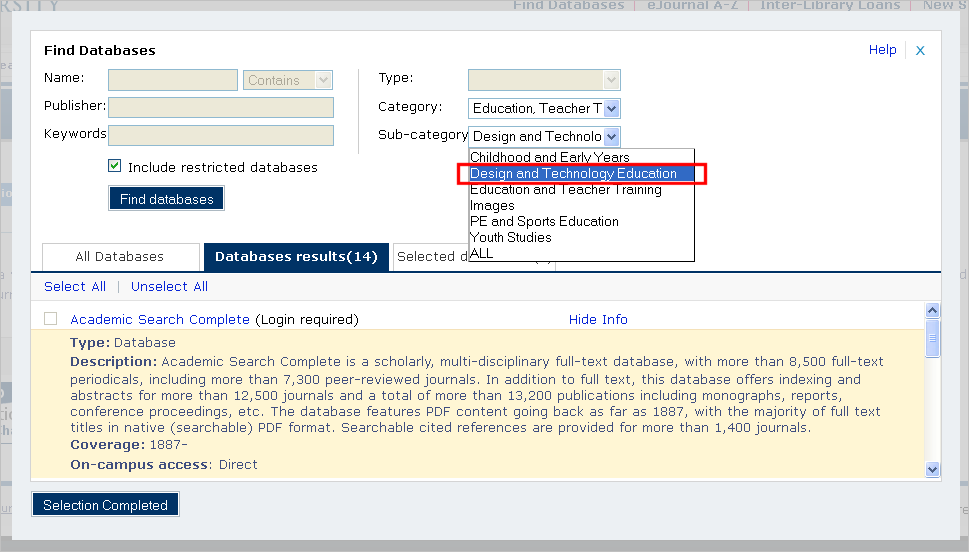
Previously, these categories were browseable within eSearch, and now they are reflected in two separate ways within Library OneSearch:
* Categories and Sub-Category assignments can be selected as both browse options and search filters in the Find a Database option in Library OneSearch (see illustration below).
* Category and Sub-Category assignments are searchable values in ‘All’ tab searches within Library OneSearch, and appear (as clickable new search options) within the Details display of all database results (see illustration below).

 eResource updates
You must be logged in to post a comment.