THE LIBRARY HAS secured access to EBSCO’s new Business Searching Interface. Check the Find Databases service for further details. Access from both on and off campusis via university username and password.
The resource is described as follows:
EBSCO’s Business Searching Interface (BSI) brings together content from Business Source Ultimate, Newswires and Regional Business News into a single interface. Browse leading business journals and magazines, search specific topics and locate country economic data, company profiles, industry information, and market research.
THE LIBRARY HAS upgraded its subscription to Business Source Complete and secured access to EBSCO’s expanded Business Source Ultimate database. Check the Find Databases service for further details. Access from both on and off campusis via university username and password.
The resource is described as follows:
Business Source Ultimate allows students to track business trends and topics worldwide with thousands of full-text journals from North America, Africa, Asia, Oceania, Europe and Latin America. Ahead of Print content from key business publishers is also included.
Please note that Art Index Retrospective (H. W. Wilson) – an archive index of historic scholarly literature in the fields of art history, architectural history, and the visual arts – has been removed from the library’s Find Databases service following the non-renewal of our subscription.
Starting Monday 28th July, EBSCO databases will feature a more streamlined and user-friendly interface. The new EBSCOhost platform will enhance the search experience, offering features such as permanent links for searches and articles, filters that carry over to future searches, and easier options for downloading and exporting.
The interface switchover will affect all EBSCOhost databases provided through NTU:
Academic Search Complete
Art Full Text (H.W. Wilson)
Art Index Retrospective (H.W. Wilson)
British Education Index
Business Source Premier
Child Development & Adolescent Studies
CINAHL Ultimate
Criminal Justice Abstracts with Full Text
eBook Collection (EBSCOhost)
EconLit with Full Text
Education Abstracts (H.W. Wilson)
Educational Administration Abstracts
ERIC
Library, Information Science & Technology Abstracts (LISTA)
MEDLINE with Full Text
Newswires
Regional Business News
SPORTDiscus with Full Text
Important information for MyEBSCO account holders If you created a MyEBSCO account to save and organise your research, please note that saved articles and saved searches will be migrated to the new EBSCOhost interface, but search alerts, journal alerts, persistent links to searches and custom folders will not be migrated.
We encourage you to make a record of your searches and journal alerts before the 28th July if you wish to recreate them on the new platform. For custom folders, please visit the How can I download the data from MyEBSCO custom folders in the classic EBSCO interfaces help page for details on how to download a report and use it to recreate your custom folder content on the new EBSCOhost interface. Please note that this feature will only be available until 31st December 2025.
MORE ELECTRONIC BOOKS in the key subject areas of neurodiversity and music production are now available in Library OneSearch, courtesy of a recent content update.
A selection of titles, all held on the EBSCOhost platform, include:
ENHANCEMENTS HAVE BEEN rolled out to support the export of larger quantities of search results from databases on both the EBSCOhost and ProQuest database platforms.
Interest has been growing, amongst students and researchers, in the ability to export multiple thousands of records from two of the library’s most widely used database platforms.
EBSCOhost
When staff and students search on any of the databases on the EBSCOhost platform (such as Academic Search Complete, Business Source Complete or SportDiscus – with Full Text) the Share feature now includes the option to generate a downloadable set of search results, up to a maximum of 25,000 records in any one set (see illustration below).
Choosing that option loads a screen on which the requester can add a preferred email address and the format in which the records should be generated (such as a .ris file).
The 25k record threshold is in effect whether the search is carried out on a single EBSCOhost database or when searching several EBSCOhost databases in combination.
Once the requested records have been compiled, the requester will receive an email including a direct download link.
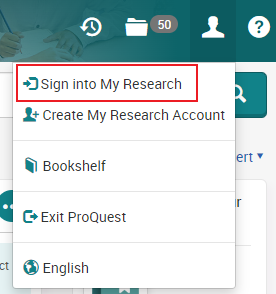
Once logged in to My Research, it’s possible to export a total of 10 thousand records in a single set.
The 10k record threshold is in effect whether the search is carried out on a single ProQuest database or when searching several ProQuest databases in combination.
When a results set contains fewer than 10k records, the Export Results feature is available (see illustration below). If a search returns more than 10k records, the Export Results option is disabled.
Licensing restrictions mean that records in some of the databases provided through the ProQuest platform are not available for export. This can be an issue when searching across multiple databases on the ProQuest site simultaneously.
When that occurs attempts to export the results will generate a pop-up message indicating that: “Your selection includes one or more articles that can’t be included in your request” (see illustration below).
There is no option which allows the automatic removal of the records in the set of search results preventing the export. However, clicking or tapping the ‘question mark’ icon in the top-right of the pop-up message (see illustration above) will display a list of the databases from which the export of records is restricted.
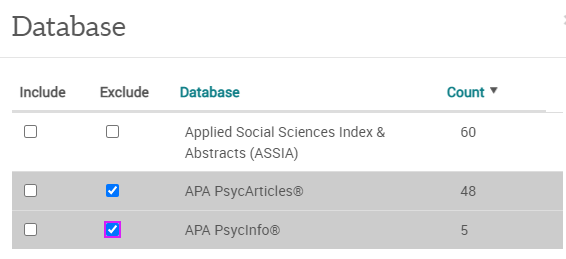
To remove the offending records from the export, first select the Database facet from the result set, and choose the More option (see illustration below).
In the Database pop-up, select the Exclude option for export-restricted databases and choose Apply (see illustration below).
Once any unexportable database records have been removed, the Export results option will open a new pop-up. Having read the ‘Terms and Conditions’, select the required export format, choose whether or not to include Abstracts, and click or tap Accept.
The requested records will not be immediately available for export, as the record set needs first to be processed on ProQuest’s servers.
To retrieve the records, access the My Research area, and select the Searches tab (see illustration below).
Newly requested exports will display and may indicate that ProQuest is still “Processing Results…” (see illustration below).
Once the processing has completed, the Exports Results option will be activated for that results set (see illustration below). Selecting the Export Results option will trigger the download of the matching saved search items in the selected format.
There is no need to remain logged into the ProQuest platform while a set of search results is processed. The next time that a student or researcher logs into their My Research area, previously saved searches will be listed in the Searches tab, along with the Export Results option.
ProQuest apply a limit of two such large exports per day. Additional search results sets can be saved in the Searches tab for future export.
ACCESS TO THE MEDLINE with Full Text database on the EBSCOhost platform is now available through the library’s Find Databases service.
The resource is described as follows:
Created by the National Library of Medicine, MEDLINE with Full Text provides access to a breadth of information on health care, nursing, dentistry, medicine, veterinary medicine and pre-clinical science. It is a gateway to access the full text of more than 1400 medical journals. The records of MEDLINE with Full Text can be search independently, or in conjunction with other databases on the EBSCOhost platform including CINAHL with Full Text.
Authenticated access to MEDLINE with Full Text is by university username and password.
Access to individual journal titles from the MEDLINE with Full Text service has also been enabled in the SFX (Find it @ NTU) service.
ACCESS TO THE CINAHL with Full Text database on the EBSCOhost platform is now available through the library’s Find Databases service.
The resource is described as follows:
CINAHL with Full Text brings together the contents of more than 600 journals in the field of nursing and allied health disciplines. These include biomedicine, health sciences librarianship, alternative and complementary medicine and consumer health. CINAHL with Full Text also provides a gateway to access health care books, nursing dissertations, selected conference proceedings, standards of practice, educational software and audiovisual materials.
Authenticated access to CINAHL with Full Text is by university username and password.
Access to individual journal titles from the CINAHL with Full Text service has also been enabled in the SFX (Find it @ NTU) service.
A collection of academic eBooks covering a wide variety of subjects and disciplines, including economics, social sciences, history, computing, cultural studies and study skills
Off-campus access to both resources is by university username and password.
THE PROBLEMS AFFECTING off-campus access to article-level content on the EBSCOhost platform reported earlier this week have now been resolved.
Off-campus request from Library OneSearch, or from any other discovery location, now resolve through a two-step process to the NTU Single Sign-on page. Once authentication is complete, off-campus access to article-level material completes successfully.
THE LIBRARY IS working with the technical team at EBSCOhost to resolve an issue with article-level access to EBSCOhost content from off-campus locations.
At present, content requests are, in some cases, resolving to an error page displaying an ‘Authentication Error 103’ (see below) following an the attempt to login through the NTU Single Sign-on service.
Database level access to all EBSCOhost content is unaffected. For the time being, the recommended workaround when access article-level EBSCOhost content from off-campus is to access the the required database from the Find Databases service and then locate the required content.
A further update will follow once the issue is confirmed as resolved.








 eResource updates
You must be logged in to post a comment.