Additional Bloomsbury resources: access period extended

TEMPORARY ACCESS ARRANGEMENTS for a range of different electronic resources provided through the Bloomsbury platform have been extended to 31 July 2020.

Details in the Find Databases listings for each of these resources have been updated to reflect this. The resources are:

All these resources remain discoverable through the list of additional electronic resources being provided during the current closure of the site libraries.

Bloomsbury Digital Resources logo

Additional electronic and online resource: Screen Studies

Screen Studies

THE SCREEN STUDIES platform, published by Bloomsbury, has been added to the current list of temporary additional electronic and online resources in the Find Databases service.

The listing for resource indicates that access is by university username and password. The resource is described as follows:

Screen Studies offers a broad range of content from Bloomsbury, Faber & Faber and the British Film Institute to support the full breadth of moving-image studies. It is designed to support the work of academics and students engaged in research and learning in film history, theory and practice.

It includes screenplays from screenwriters including Christopher Nolan, Wes Anderson, Joel and Ethan Coen and many others. Alongside award-winning screenplays, it comprises an interactive timeline of film history, an expanding collection of film stills, and more than 240 eBooks from both Bloomsbury and Faber & Faber. Available eBook content includes film biographies, scholarly monographs, filmmaking and screenwriting guides.

Screen Studies explores films, directors and genres from across the world, covering the US, Europe, Asia and beyond, with contents indexed by regions, and well as by genres and approaches.

Screen Studies is available to university staff and students until at least the end of May 2020.

Additional electronic and online resources

New Find Databases - browse by letter

DURING THE CURRENT closure of the campus libraries, LLR is making additional electronic resources available for off-campus access by staff and students.

This material is a mixture of content that publishers are making openly available to Higher Education institutions during the Covid-19 pandemic, and materials that the library has been able to licence paid-access to for a time-limited period.

The current full list of additional resources is available from the dedicated Find Databases link https://llr.ntu.ac.uk/dbaz/index.php?extra=y.

More resources are being added to list as new access arrangements are finalised.

Each of these resources has been added to the relevant subject sub-categories in the Find Databases service, and can be identified by the New temporary resource icon show below.

New temporary resource icon


New resource: Bloomsbury Fashion Central

Bloomsbury Fashion Central

TITLES IN THE Bloomsbury Fashion Central collection are now discoverable through Library OneSearch, and the platform itself is accessible through the Find Databases service.

Access to all subscribed content on the platform is direct on-campus and by university username and password off-campus.

For its database entry, the resource is described as follows:

Bloomsbury Fashion Central is a digital hub for interdisciplinary research in fashion and dress. It includes major reference works, articles, eBooks, video content, runway and backstage photos from fashion shows, and tens of thousands of images from museums around the world. There are three resources to explore:

The Berg Fashion Library contains over 100 eBooks, more than 13,000 colour images and other reference works.

This is complemented by the Fairchild Books Library, which includes another 150 eBooks on all aspects of fashion.

Finally, the Fashion Photography Archive covers forty years of contemporary fashion history and contains over 750,000 images.

Sample eBook titles in the collection include the following:

Off-campus access issues affecting Bloomsbury Collections

We are currently experiencing problems with accessing content on the Bloomsbury Collections platform from off-campus.

The cause of the problem is under investigation.

E1

Evidence Based Acquisition (EBA) eBook project enters selection phase

The library’s current Evidence Based Acquisition (EBA) eBook project, which involved making tens of thousands of new eBook titles available for customer discovery in Library OneSearch, has entered its selection phase (during which the library decides which titles will be bought outright in perpetuity, and which will be withdrawn from the collection). This selection process has begun, following the conclusion of the discovery phase of the project at the end of April.

While final selections are agreed, the following sets of eBook titles have been suspended from discovery in Library OneSearch:

  • Bloomsbury (2,013 titles)
  • Cambridge University Press (30,391 titles)
  • Sage (4,306 titles)
  • Oxford Scholarship Online (11,812 titles)

EBA eBook titles which have been added to resource lists during the discovery phase should still continue to be accessible through the links provided in the RLMS.

Once title selections have been confirmed for each provider, the purchased titles will updated and made discoverable once again in Library OneSearch.

The Wiley EBA package (consisting of 17,879 titles) will continue to be active until the end of May.

Bloomsbury – off-campus authentication issues resolved

The previously reported problems preventing off-campus access to eBook titles on the Bloomsbury Collections platform have now been resolved.

Off-campus access is available once again by university username and password. An illustrated walkthrough of each step in the off-campus login process is available.

Bloomsbury Collections eBook titles: off-campus access currently unavailable

Off-campus access to eBook titles in the Bloomsbury Collections set is currently unavailable due to a problem affecting Bloomsbury’s Shibboleth Service Provider.

Off-campus login requests (via NTU username and password) are currently resolving to an error page. A further update will follow once off-campus access to Bloomsbury Collections’ content has been reinstated. On-campus access (via IP authentication) is unaffected.

Bloomsbury Collections - Shibboleth option

New resource: Bloomsbury eBook collection

Around 2000 eBook titles from Bloomsbury Collections are now available in Library OneSearch, and form part of the continuing ‘Your Books, More Books’ campaign. Example titles include:

Access to Bloomsbury eBook titles in the 40 collections which the library has subscribed to is direct on-campus and by university username and password from off-campus. At present, support for the Shibboleth protocol on the Bloomsbury Collections platform is limited, so we are unable to incorporate authentication-aware direct title-level deep-links in the Library OneSearch records for customers accessing Bloomsbury Collections titles from off-campus.

As a consequence, the current off-campus experience when logging in to the first Bloomsbury Collections book involves several steps (which are documented below). The library is continuing to impress on Bloomsbury the need to improve this far from seamless off-campus experience, and Bloomsbury’s technical team are reviewing LLR’s specification for improved off-campus deep-linking. Further updates will be provided as and when this element of the service offer improves. The current walkthrough for off-campus access is as follows:

Follow the View Online link from Library OneSearch, and on the Summary page for the requested title select the login option (see below).

Bloomsbury Collections - Shibboleth access - Library OneSearch

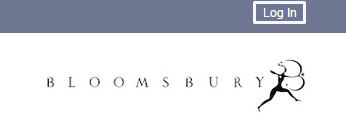
Select the Log In option in the top-right of the display on the Bloomsbury Collections site (see below).
Bloomsbury Collections - Login option

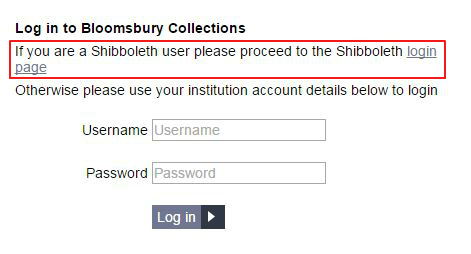
On the main Log in page, select the link for the Shibboleth login page (see below).
Bloomsbury Collections - Shibboleth option

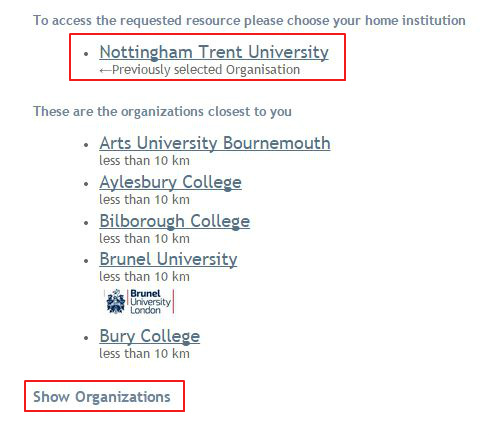
On the Shibboleth WAYF (‘Where Are You From?’) page, select ‘Nottingham Trent University’ (if this option displays at the top of the list), and click on that link to be resolved to the NTU Single Sign-on page. If this option does not display, click on the Show Organizations link (see below).
Bloomsbury Collections - Shibboleth WAYF page

This will reveal a full list of organizations and a filter search box (see below). In the search box, type ‘Nottingham Trent University’ and click on that entry in the results list. This will resolve the browser to the NTU Single Sign-on page.
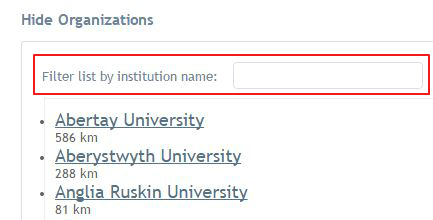
Bloomsbury Collections - Shibboleth WAYF page - find Nottingham Trent University

After successfully signing in with a university username and password, the browser will resolve to the Bloomsbury Collections home page. Confirmation of your logged-in status is provided by the display of the phrase: ‘Bloomsbury Collections – Access provided by Nottingham Trent University‘ (see below).
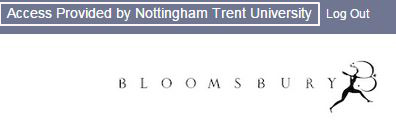
Bloomsbury Collections - Access provided by Nottingham Trent University

To access the requested eBook, click on the Recently Viewed link to reveal a list of recently requested titles, and click on the required title (see below).
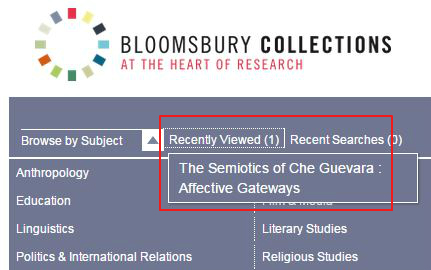
Bloomsbury Collections - Recently Viewed link

When the browser resolves to the requested eBook page, the unlockled padlock icon next to the the phrase ‘Subscription-based Access’ is further confirmation that access to the full-text of the title is now available.

Bloomsbury Collections - Access to a subscription title

Subsequent requests from Library OneSearch to Bloomsbury Collection titles (in the same off-campus session) will resolve to the authenticated full-text at the title level.