New Emerald eBook collections activated

Emerald Insight eBooks - 2015 additions to Library OneSearch

A total of 105 new eBooks from the Emerald Business, Management & Economics collection (the current front-list for 2015) and 529 titles from the Emerald Social Sciences collection (the archive for 1999-2014 and the front-list for 2015) have been added to Library OneSearch.

As with other Emerald eBook titles, access (at the individual title level) is by university username and password – which ensures that the library can provide authentication-aware deep-links in Library OneSearch which work from both on-campus and off-campus locations.

New titles in the BM&E collection include:

New titles from the SS collection include:

JSTOR – Shibboleth maintenance – 20-25 August

The technical team at JSTOR advise that beginning today (20 August) they are carrying out some maintenance work on their Shibboleth infrastructure – work that may cause authentication delays for new off-campus visitors to the platform. They report:

Shibboleth users that are logging into JSTOR for the first time (e.g. new accounts) may experience between a 5-30 minute delay in being authenticated. We recommend that if users have this experience, they come back to JSTOR and login again after 30 minutes has past. At that point, they should gain access immediately.
Please note that this only impacts new users. Users that have already logged into JSTOR prior to today should not experience any delay.

It is expected that the work will be completed early next week (by 25 August). Direct on-campus access will not be affected by this work.

Bloomsbury – off-campus authentication issues resolved

The previously reported problems preventing off-campus access to eBook titles on the Bloomsbury Collections platform have now been resolved.

Off-campus access is available once again by university username and password. An illustrated walkthrough of each step in the off-campus login process is available.

Dawsonera eBooks: access restored

Access to eBooks on the Dawsonera platform has been restored, following the resolution of the issues affecting the Dawsonera Shibboleth service provider.

Dawsonera eBook platform: access currently unavailable

Access to eBook titles on the Dawsonera is currently unavailable to library customers due to technical problems affecting the Dawsonera Shibboleth service provider. A further update will follow once access has been restored.

Withdrawn resource: ICONDA

Access to ICONDA (a bibliographic database covering building, construction and architecture, delivered through the OVID-SP platform) has been withdrawn from the Find Databases service in Library OneSearch following the conclusion of the library’s subscription to the resource.

UK Press Online – platform update

The UK Press Online service have just launched an updated version of their discovery platform. (LLR has been involved in some pre-release technical testing of the new interface.) Access to the service remains direct on-campus and by university username and password from off-campus.

Library customers accessing UK Press Online from off-campus through Library OneSearch will be automatically directed to the university’s single sign-on page. Anyone navigating to the platform independently from off-campus, will need to select the UK Federation Access option from the UK Press Online login page (see illustration below), and then search for ‘Nottingham Trent University’ on the Where Are You From (WAYF) page.

UK Press Online - new Shibboleth login screen

New ejournal package: SpringerLink Journals (NESLi2)

A new collection of more than 1300 ejournals titles, provided through the SpringerLink Journals (NESLi2) package, is now available in Library OneSearch and through SFX. Access is direct on-campus and by university username and password from off-campus. For most titles in the collection, full-text access is available from 1997 onwards. Titles include:

MyiLibrary – Shibboleth resolution issue resolved

A technical issue affecting the MyiLibrary eBook platform, which arose at the end last week, has now been resolved. WAYFLess URLs in eBook records in Library OneSearch were resolving to the MyiLibrary homepage rather than to the indivIdual requested eBook. Resolution to title level has been reinstated and requests are now resolving as intended.

Keynote: new WAYFLess access URL to new interface

The WAYFLess access URL for the Keynote service (the URL which routes the requester straight to the NTU Single Sign-on page) has been updated in Library OneSearch, following the launch of the new Keynote platform. Access remains by university username and password from on-campus and off-campus.

Keynote interface - April 2015

Sage Knowledge eBook collection

As part of the continuing growth of the ‘Your Books, More Books’ service, just over 4,300 new eBook titles from Sage Knowledge are now discoverable in Library OneSearch. Example titles include:

Access to all subscribed titles in the collection is direct on-campus, and by university username and password from off-campus. At present, support for the Shibboleth protocol on the Sage Knowledge platform is limited, so we are unable to incorporate authentication-aware direct title-level deep-links in the Library OneSearch records for customers accessing Sage Knowledge titles from off-campus.

As a consequence, the current off-campus experience when logging in to the first Sage Knowlege book in a collection involves several steps (which are documented below). The library is continuing to impress on Sage the need to improve this far from seamless off-campus experience, and further updates will be provided as and when this element of the service offer improves. The current walkthrough for off-campus access is as follows:
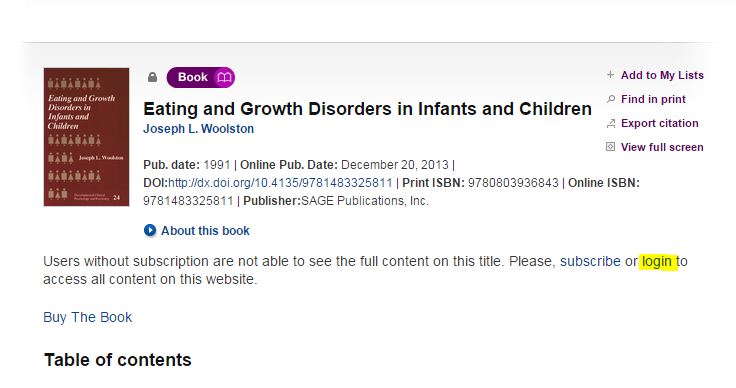
Sage Knowledge - eBook - select 'Login'

Follow the Online link from Library OneSearch, and on the Summary page for the requested title select the login option (see above).

Sage Knowledge - eBook - select 'Login via institution'

On the login pop-up which displays, select Login via your institution (see above).

Sage Knowledge - eBook - 'Select institution'

From the Please select your institution list locate ‘Nottingham Trent University’ and click on the Go to Login button (see above). On the NTU Single Sign-on page, enter your university username and password and log in.

Sage Knowledge - eBook - NTU login confirmed

Your browser will be returned to the homepage of the Sage Knowledge platform (and not to the individual eBook record). In the top-right hand corner of the screen, the display of ‘Nottingham Trent University’ will confirm that the login request has been processed successfully.

Sage Knowledge - eBook - NTU login confirmed

Return the brower to the tab or page containing the display of results from Library OneSearch and click on the View Online link for a second time. This will return the display in your browser of the Sage Knowledge platfom to the authenticated full-text of the requested eBook, with the display of the Nottingham Trent University logo in the top right-hand of the screen confirming that a current logged-in session is active.

Subsequent requests from Library OneSearch to Sage Knowledge titles (in the same off-campus session) will resolve to the authenticated full-text at the title level.

OSIRIS – off-campus access currently unavailable

Off-campus access to the OSIRIS database is currently unavailable, due to technical problems affecting the authentication connection with the service. A notification has been added to the OSIRIS listing in Library OneSearch, alerting customers to this issue:

Off-campus access to the OSIRIS service is currently unavailable due to technical issues. The library will restore off-campus access to the service as soon as possible.