eSearch ‘Find a database’ search widget withdrawn from LLR web site home page

Following initial feedback on the new LLR web site, the site project group have decided to withdraw the eSearch ‘Find a database’ search widget from the LLR home page.

An ‘Information Direct’ button and explanatory text have been added in its place (see illustration below).
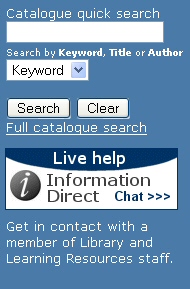
LLR web site Library Catalogue search widget

The Library Catalogue search widget on the LLR home page has been retained (see illustration above). However, please be aware that the link to ‘My Library Card’ which previously appeared under the Search and Clear buttons has been replaced with a ‘Full Catalogue Search’ link, which opens up the ‘Basic Search’ screen of the Library Catalogue in a new window.

The principal access route to eSearch in the LLR web site can now be found under the ‘Resources and Collections’ heading of the LLR web site (see illustration below – click on image for larger version).
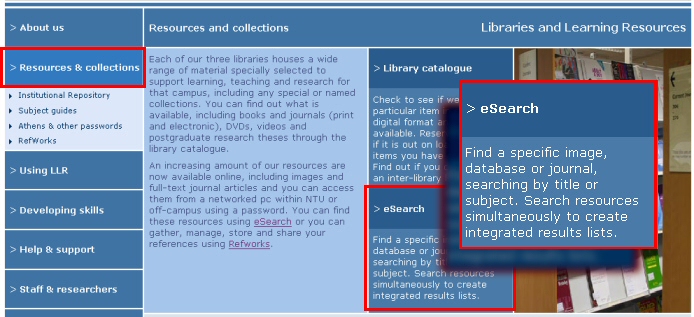
LLR web site - Resource and Collections section showing principal access route to eSearch

In light of this change, LLR is reviewing the Library Search widget in NOW (the new VLE) to see whether it would be appropriate to ‘match’ the revised LLR web site search widget by withdrawing the ‘Find a database’ eSearch search option from there as well.
Credo Reference – Athens login URL updated

The off-campus direct Athens login URL for the Credo Reference service has been updated in eSearch (for all five separate Credo listings: Complete; Biography; Dictionaries; Encyclopedias; Quotations) and now points to: http://www.credoreference.com/authathens.do.

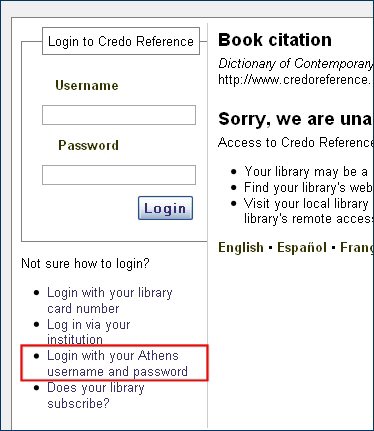
From within the Credo Reference interface, off-campus customers can access the login screen through the Login with your Athens username and password link under the ‘Book citation’ screen of any selected title (see illustration below).

Credo Reference login screen with Athens login link highlighted

Please be aware that, although Credo Reference offers a ‘Log in via your institution’ link (which connects to a Shibboleth login process), LLR is not yet supporting Shibboleth authentication for this service. eServices is working with Credo’s technical team on a number of issues which need to be resolved before LLR can migrate to Shibboleth-based authentication.

NTU banner in eBrary restored

Further to the last eServices update, the NTU banner at the top of each page of the eBrary interface has now been restored. (The banner had ceased to display correctly following the withdrawal of the Shelob web server.) Links from the eBrary site to the NTU homepage, the LLR homepage, the eBrary Reader download screen and the NTU eBrary User Guide are now available again and working normally.

Shibboleth login screen – amended layout

Following feedback from the ALT on the look-and-feel of the Shibboleth login screen, IS agreed to introduce a number of enhancements and refinements to the page. These changes went live last week. Overall, the changes streamline and simplify the look of the page. Specific changes include:

  • Changing the description ‘NTU Single Signon’ to NTU Single Sign-on
  • Removing the repeated and overlapping references to ‘logging in’
  • Increasing the default text size on the page
  • Replacing the ‘end of your session’ prompt with a simpler and more appropriate phrase

Further feedback on the design and useability of this page is welcomed.

‘Instructional guides’ and the LLR web site

Guides to registering for services such as Digimap, Land of Lost Content and WGSN; and to using services such as SciFinder Scholar, which used to available in the LLR web site are not currently accessible. This set of ‘instructional guides’ has not yet been migrated from the previous LLR web site template to the new web site design. These guides, which are accessed through links in eSearch (in the ‘information’ pop-up window for the relevant resource), should be available again shortly. A further update will follow once these guides have been recreated in the new LLR web site.

Unscheduled withdrawal of the ‘Shelob’ web server

The Shelob web server was withdrawn from service at NTU last week, leading to the loss of access to several important web files still being used by LLR on the server. This meant that the links in eSearch to BCIS (Building Cost Information Service) and FORS (Forensic Science Service) temporarily stopped working. This links have now been reinstated. It has also meant that the NTU ‘banner’ in the eBrary eBook interface no longer displayed correctly. This banner will be reinstated by eBrary shortly.

LLR Search widget for NOW – new version live next week

An updated version of the Library Search widget for NOW (the new VLE) is scheduled to go live on 7 October. (As a reminder – the widget is identical to the one embedded in the home page of the new LLR web site.) This updated version of the widget will display much more consistently and predictably in the three column layout of NOW.

Posted in NOW