eBrary – access problems affecting eBook content

eBrary’s technical team is working to resolve a problem which is causing access problems to eBook titles on the eBrary platform.

Some customers clicking on links to eBrary eBook titles in the Library Catalogue will see their browser resolve to the eBrary site with the following error message:

The URL entered or pasted is not one we recognize. If you copied and pasted the URL to get here, please double check the format. Make sure all the terms are there and that the URL contains no spaces or return characters.

Not all requests result in the error, and eBrary’s technicians currently believe that the Internet Explorer browser in more susceptible to the problem than Firefox – and recommend trying the Firefox browser in preference (though this will not guarantee successful access).

A further update will follow once eBrary’s technical team has confirmed that the problem has been resolved.

eBrary – changes to collection content from February 2010

Libraries and Learning Resources’ subscription to the Academic Complete collection of eBooks on the eBrary platform concludes at the end of January.

Rather than subscribing to this package of 30K+ titles (not all of which were well used by staff and students) the Academic Liaison Team has identified a sub-set of several hundred key titles from within the collection which LLR wishes to offer continuing access to.

Access to these titles, from 1 Feburary 2010, have now been arranged with eBrary through a new Custom Collection put together for LLR. Titles in the eBrary Custom collection are grouped into three types:

* Multi-user access – perpetual: LLR has bought these titles outright, in perpetuity. There is no limit to the number of customers who may access these titles at any one time.

* Single-user access – perpetual: LLR has bought these titles outright, in perpetuity. Only one customer may access these titles at any one time.

* Multi-user access – rental: LLR has subscribed to these titles. There is no limit to the number of customers who may access these titles at any one time. Continuing access to these titles is dependent on LLR maintaining a subscription.

New records have been added to ALEPH for all of the eBrary Custom Collection titles. Before the end of the next week (when LLR’s subscription to the eBrary Academic Complete collection expires) all of the eBrary Academic Complete catalogue records will be removed from ALEPH. Until then, duplicate catalogue records will appear for those eBrary titles which are in both the Academic Complete and Custom collections.

When reviewing an individual eBrary catalogue record within the OPAC, LLR staff can identify the type of eBrary eBook they are looking at, as follows:

In the Full View of Record, click on the MARC tags option (see illustration below):

In the 900 field of the MARC record, a description of the eBrary collection to which the title belongs is provided:

All eBrary catalogue records containing the description ‘This eBook is part of the eBrary Academic Complete subscription‘ will be withdrawn (see illustration below):

All eBrary catalogue records containing one of the three descriptions below will be retained:

If you’ve any questions about the changes to eBrary content, please contact Acquisitions Manager Paul Tomlinson. If you’ve any technical questions about the transition to the new collection, please contact Lib eServices.

A further update will be provided next week when all of the eBrary Academic Complete collection records have been withdrawn from ALEPH.

eBrary eBook platform – access problems resolved

The access problems affecting the eBrary eBook platform (reported on Tuesday 8 December) have now been fully resolved. eBrary’s technicians were able to resolve most of the access issues later the same day, though some secondary problems persisted. This morning, eBrary were able to confirm that all remaining access issues had been dealt with and the service was fully operational once again.

eBrary eBook collection unavailable

The eBrary eBook web site is currently unavailable. Requests to all eBrary titles through the Library Catalogue, or to the eBrary platform itself through eSearch, are returning the following error:

Our site is unavailable at the moment
We are installing improvements to our service.
We apologize for the inconvenience.
Please check back later.

This is not a scheduled downtime, but a loss of service which eBrary anticipate that they will be able to correct shortly.

A further update will follow once eBrary have confirmed that access to the service has been restored.

eBrary bookshelf migration

As indicated in an earlier update, LLR customers who previously logged in to the eBrary eBook platform using an Athens username and password and who wish to retain access to their customised eBrary Bookshelf content can have that content moved across to their new eBrary account (based on their university username and password).

Instructions on how to arrange the transfer had been added to a ‘Bookshelf Migration Instructions’ button in the banner of the eBrary interface.

However, initial experience suggests that some customers have found the process difficult to follow. As a result, migration requests will now be mediated by the eServices team who will liaise with eBrary support on the customer’s behalf to arrange the transfer. An updated and simplified version of the instructions now reads:

From 1 September 2009, access to ebooks on the ebrary platform for Nottingham Trent University staff and students is by university username and password.

If you have logged into ebrary previously (using an Athens username and password) you may have stored notes, bookmarks and highlighted sections of text in your ebrary Bookshelf.

If you do not want to retain any of the ebrary Bookshelf data that you previously created under your Athens login, you need take no further action. However, if you want to transfer this Bookshelf data so that you can access it with your university username and password, please do the following:

Send an email with the subject line eBrary bookshelf migration to eServices email address and include your university username in the body of the email.

LLR will then arrange with ebrary support to have your bookshelf content migrated to your new university username and password login.

Once confirmation has been received from eBrary that the migration has been completed, the eServices team will contact the customer by email and ask them to confirm that the process has been successful.

eBrary – Shibboleth authentication

Access to eBooks on the eBrary platform is now by university username and password (using Shibboleth). Because of the way in which Shibboleth authentication is managed for LLR’s subscription to eBrary, all existing URLs in eSearch, SFX and the Library Catalogue will continue to work as before, but will now resolve to the NTU Single Sign-on page rather than to an Athens login screen. Staff and students who wish to retain their customised eBrary content (stored in their Bookshelf) will need to contact eBrary to arrange the migration of data to their new login. A guide to the simple email-based process is provided via a ‘Bookshelf Migration’ link from the Nottingham Trent University banner in the eBrary interface (see illustration below).

eBrary_BookShelf_migration

Athens to Shibboleth migrations – eBrary and RefWorks

The move from Athens to Shibboleth authentication for both eBrary and RefWorks is now scheduled to take place during the last two weeks of August.

RefWorks’ technical team are running tests on a sample data set that we have provided before moving to the wholesale transfer of the existing accounts from Athens to Shibboleth identifiers – this will mean that existing customer accounts (including all saved references and folders) will be automatically transfered over when the move to Shibboleth is effected.

For LLR customers with ‘Bookshelf’ content (saved favourites, notes, highlighted sections of eBooks, etc) in their eBrary account, a different method has been agreed with the providers. Once the Shibboleth login process has been activated on eBrary, customers will have the option to pull across their previously stored ‘Bookshelf’ information from their Athens to their Shibboleth account. This involves the customer copying a ‘key’ number from the screen into an email to eBrary along with their Athens username; eBrary then manage the move of the data on their behalf. Customers who have not previously used the ‘Bookshelf’ facility, or who do not wish to transfer their previous saved content, are not required to take any action. The simple process of arranging the ‘Bookshelf’ transfer will, of course, be fully documented with eServices providing all necessary technical support.

eBrary eBooks – Understanding the ‘Document unavailable’ message

LLR’s subscription to eBooks on the eBrary platform is to a virtual ‘collection’ of several tens of thousands of eBook titles. Like other ‘aggregator’ collections the subscription guarantees access to the collection as it changes and evolves over the course of the subscription rather than to a fixed list of guaranteed titles. As publisher agreements with eBrary change, new titles are routinely added to the collection and some existing titles are withdrawn from it.

Once a month, eBrary publishes a list of the titles that have been added to, and withdrawn from, the collection over the course of the previous four weeks – sometimes the changes affect less than a dozen titles in total; at other times the changes involve a hundred items or more (out of an overall collection of 30,000+ titles). As these lists of changes are published, the eServices team adds catalogue records for additions to the eBrary collection to ALEPH, and deletes catalogue records for withdrawn eBrary titles.

As these updated lists are only published monthly by eBrary, and then require processing and loading/deleting on ALEPH by LLR, there will sometimes be brief periods when there are some eBrary catalogue records on ALEPH for titles that have been withdrawn by eBrary. In these cases, clicking on the link in the Library Catalogue will produce a ‘Document unavailable’ message (see sample illustration below). There may also be new eBrary titles now available in the collection for which individual catalogue records have yet to be added to ALEPH.

If you encounter any examples where a ‘Document unavailable’ response to an eBrary catalogue record is proving particularly problematic for customers, please provide the eServices team with the details and we will arrange to suppress the appearance of that record in the catalogue pending confirmation from eBrary of the title’s withdrawal from the collection. That record will be removed from the catalogue during the next eBrary record update; and any new records will be added.

The 'Document Unavailable' prompt on the eBrary eBook platform

New interface: eBrary eBook platform

An updated eBrary interface is due to go live for all existing customers in the next 24-hours (see a sample illustration below). eServices will be testing all aspects of the new interface as soon as is it live for LLR’s subscription, and IR will review the existing local eBrary documentation, updating it as necessary.

ebrary_09_a

As well as design and presentational changes, probably the most significant change is the introduction of a default QuickView display for each eBook in the collection. Essentially, QuickView offers a read-but-don’t-touch view of the full-text content – and does not require the eBrary web browser plug-in. However, QuickView does not offer the full interactive functionality that the plug-in offers (such as such as printing, adding notes, or adding highlights).

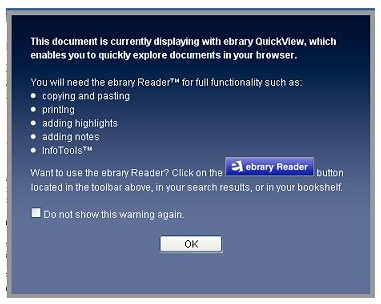
When viewing content in QuickView, a display offers the customer the option to launch the eBrary Reader plug-in – for copying, printing, notes, highlighting and InfoTools (see illustration below). If a customer clicks on that eBrary Reader button, the plug-in will launch and all of that functionality will become available.

ebrary_09_b

If, in QuickView, a customer clicks anywhere on the page of an eBook (in an attempt to highlight text, for example), a pop-up window will launch, informing them of the need to launch the eBrary Reader (see illustration below).

ebrary_09_c

Once the eBrary Reader is clicked, the plug-in will load in a new window along with an interactive version of the eBook content.

eBrary’s intention in making this change is to remove the need to activate the browser plug-in if all the visitor wants is to search, browse and read the eBook text.

NTU banner in eBrary restored

Further to the last eServices update, the NTU banner at the top of each page of the eBrary interface has now been restored. (The banner had ceased to display correctly following the withdrawal of the Shelob web server.) Links from the eBrary site to the NTU homepage, the LLR homepage, the eBrary Reader download screen and the NTU eBrary User Guide are now available again and working normally.

Unscheduled withdrawal of the ‘Shelob’ web server

The Shelob web server was withdrawn from service at NTU last week, leading to the loss of access to several important web files still being used by LLR on the server. This meant that the links in eSearch to BCIS (Building Cost Information Service) and FORS (Forensic Science Service) temporarily stopped working. This links have now been reinstated. It has also meant that the NTU ‘banner’ in the eBrary eBook interface no longer displayed correctly. This banner will be reinstated by eBrary shortly.

eBrary – extra prompts to download the reader for off-campus customers

Following recent feedback, additional prompts for off-campus customers using the eBrary service have been added to the eBrary interface, indicating the need for them to download the eBrary Reader software (see illustration below). Clicking on that link will launch a new window from which the software can be downloaded.

Screencapture of the eBrary platform indicating the new prompt

Additional links and texts prompts have also been added to the information icon for eBrary in eSearch (see below).

Screen capture from eSearch indicating the new prompt

Only customers coming from off-campus will need to install the eBrary reader, which should automatically be installed on any on-campus PC. If you discover any instances on-campus where the software appears to be missing, please report the location and machine name to the eServices team.