Cambridge University Press EBA package: 560 new titles added

A further 560 new eBook titles have been added to the Cambridge University Press EBA package available through Library OneSearch. New titles include:

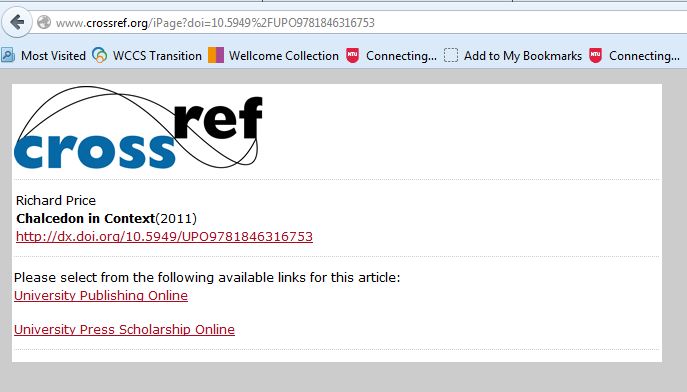
For a small number of titles, clicking on the View Online link in Library OneSearch will result in a CrossRef DOI disambiguation page: listing more than one possible discovery destination for the requested eBook title (see illustration example below). In order to access the full-text of the title, select the University Publishing Online link; as this is the platform through which the library’s full-text access is available.

CrossRef - DOI disambiguation

New ejournal package: SpringerLink Journals (NESLi2)

A new collection of more than 1300 ejournals titles, provided through the SpringerLink Journals (NESLi2) package, is now available in Library OneSearch and through SFX. Access is direct on-campus and by university username and password from off-campus. For most titles in the collection, full-text access is available from 1997 onwards. Titles include:

MyiLibrary – Shibboleth resolution issue resolved

A technical issue affecting the MyiLibrary eBook platform, which arose at the end last week, has now been resolved. WAYFLess URLs in eBook records in Library OneSearch were resolving to the MyiLibrary homepage rather than to the indivIdual requested eBook. Resolution to title level has been reinstated and requests are now resolving as intended.

ElgarOnline eBook platform currently offline

The ElgarOnline eBook platform (through which the library currently accesses the ElgarOnline eBook Business Collection) is currently offline. ElgarOnline’s engineers are working to return the service to normal operation as soon as possible.

Update: Service problems affecting Science Direct and Scopus

Intermittent problems have returned to affect both the Science Direct and Scopus services this morning (9 June 2015); with some requests timing out or ending in ‘service unavailable’ responses.

Further updates will follow as the situation is resolved.

Update: Service problems affecting Science Direct and Scopus

The reported service problems (8 June 2015) affecting the Elsevier Science Direct and Scopus platforms appear to have been successfully resolved.

Service problems affecting Science Direct and Scopus

An unscheduled service outrage is currently preventing access to all Science Direct and Scopus services. A further update will follow once all services have been recovered.

New resource: Bloomsbury eBook collection

Around 2000 eBook titles from Bloomsbury Collections are now available in Library OneSearch, and form part of the continuing ‘Your Books, More Books’ campaign. Example titles include:

Access to Bloomsbury eBook titles in the 40 collections which the library has subscribed to is direct on-campus and by university username and password from off-campus. At present, support for the Shibboleth protocol on the Bloomsbury Collections platform is limited, so we are unable to incorporate authentication-aware direct title-level deep-links in the Library OneSearch records for customers accessing Bloomsbury Collections titles from off-campus.

As a consequence, the current off-campus experience when logging in to the first Bloomsbury Collections book involves several steps (which are documented below). The library is continuing to impress on Bloomsbury the need to improve this far from seamless off-campus experience, and Bloomsbury’s technical team are reviewing LLR’s specification for improved off-campus deep-linking. Further updates will be provided as and when this element of the service offer improves. The current walkthrough for off-campus access is as follows:

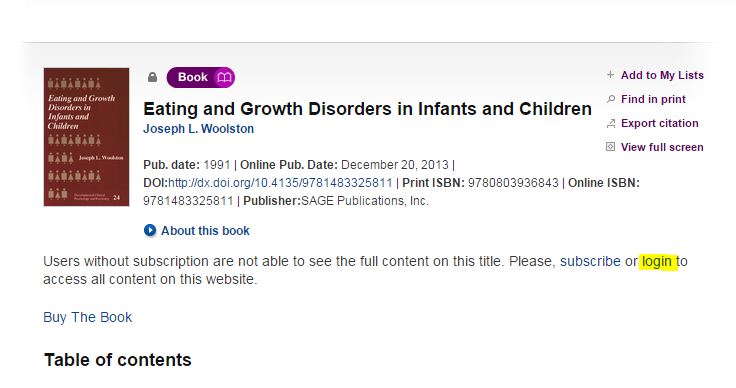
Follow the View Online link from Library OneSearch, and on the Summary page for the requested title select the login option (see below).

Bloomsbury Collections - Shibboleth access - Library OneSearch

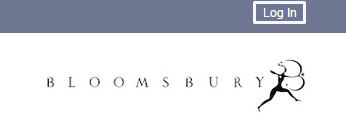
Select the Log In option in the top-right of the display on the Bloomsbury Collections site (see below).
Bloomsbury Collections - Login option

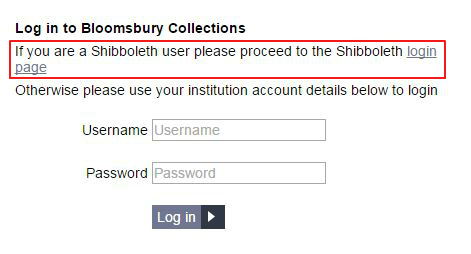
On the main Log in page, select the link for the Shibboleth login page (see below).
Bloomsbury Collections - Shibboleth option

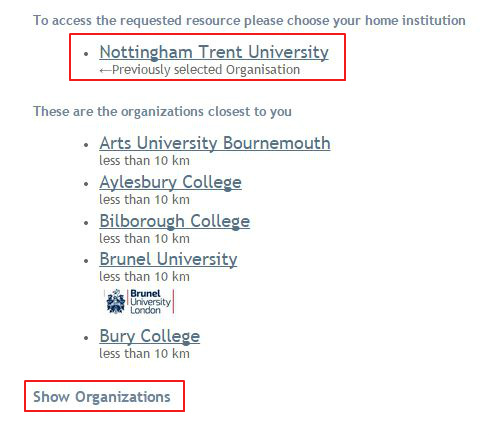
On the Shibboleth WAYF (‘Where Are You From?’) page, select ‘Nottingham Trent University’ (if this option displays at the top of the list), and click on that link to be resolved to the NTU Single Sign-on page. If this option does not display, click on the Show Organizations link (see below).
Bloomsbury Collections - Shibboleth WAYF page

This will reveal a full list of organizations and a filter search box (see below). In the search box, type ‘Nottingham Trent University’ and click on that entry in the results list. This will resolve the browser to the NTU Single Sign-on page.
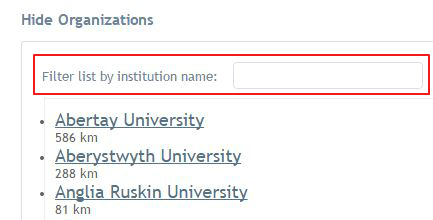
Bloomsbury Collections - Shibboleth WAYF page - find Nottingham Trent University

After successfully signing in with a university username and password, the browser will resolve to the Bloomsbury Collections home page. Confirmation of your logged-in status is provided by the display of the phrase: ‘Bloomsbury Collections – Access provided by Nottingham Trent University‘ (see below).
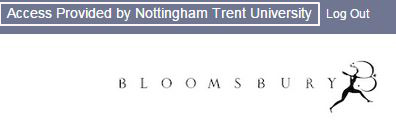
Bloomsbury Collections - Access provided by Nottingham Trent University

To access the requested eBook, click on the Recently Viewed link to reveal a list of recently requested titles, and click on the required title (see below).
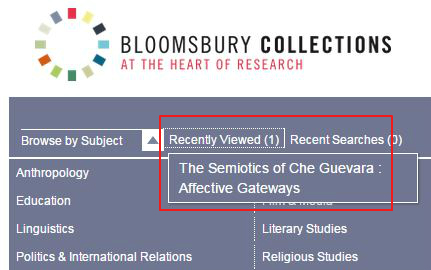
Bloomsbury Collections - Recently Viewed link

When the browser resolves to the requested eBook page, the unlockled padlock icon next to the the phrase ‘Subscription-based Access’ is further confirmation that access to the full-text of the title is now available.

Bloomsbury Collections - Access to a subscription title

Subsequent requests from Library OneSearch to Bloomsbury Collection titles (in the same off-campus session) will resolve to the authenticated full-text at the title level.
Keynote: new WAYFLess access URL to new interface

The WAYFLess access URL for the Keynote service (the URL which routes the requester straight to the NTU Single Sign-on page) has been updated in Library OneSearch, following the launch of the new Keynote platform. Access remains by university username and password from on-campus and off-campus.

Keynote interface - April 2015

RefWorks service issue – 26 March 2015

Customer Services were alerted to issues affecting RefWorks services yesterday evening (26 March) shortly after 19:00. These included slow response times, page time-outs and browser errors.

On- campus use of RefWorks was particularly high at the time, due to assignment submission deadlines.

The RefWorks technical team in the US were able to identify and rectify the problem, and confirmed full recovery of services before 20:40.

Sage Knowledge eBook collection

As part of the continuing growth of the ‘Your Books, More Books’ service, just over 4,300 new eBook titles from Sage Knowledge are now discoverable in Library OneSearch. Example titles include:

Access to all subscribed titles in the collection is direct on-campus, and by university username and password from off-campus. At present, support for the Shibboleth protocol on the Sage Knowledge platform is limited, so we are unable to incorporate authentication-aware direct title-level deep-links in the Library OneSearch records for customers accessing Sage Knowledge titles from off-campus.

As a consequence, the current off-campus experience when logging in to the first Sage Knowlege book in a collection involves several steps (which are documented below). The library is continuing to impress on Sage the need to improve this far from seamless off-campus experience, and further updates will be provided as and when this element of the service offer improves. The current walkthrough for off-campus access is as follows:

Sage Knowledge - eBook - select 'Login'

Follow the Online link from Library OneSearch, and on the Summary page for the requested title select the login option (see above).

Sage Knowledge - eBook - select 'Login via institution'

On the login pop-up which displays, select Login via your institution (see above).

Sage Knowledge - eBook - 'Select institution'

From the Please select your institution list locate ‘Nottingham Trent University’ and click on the Go to Login button (see above). On the NTU Single Sign-on page, enter your university username and password and log in.

Sage Knowledge - eBook - NTU login confirmed

Your browser will be returned to the homepage of the Sage Knowledge platform (and not to the individual eBook record). In the top-right hand corner of the screen, the display of ‘Nottingham Trent University’ will confirm that the login request has been processed successfully.

Sage Knowledge - eBook - NTU login confirmed

Return the brower to the tab or page containing the display of results from Library OneSearch and click on the View Online link for a second time. This will return the display in your browser of the Sage Knowledge platfom to the authenticated full-text of the requested eBook, with the display of the Nottingham Trent University logo in the top right-hand of the screen confirming that a current logged-in session is active.

Subsequent requests from Library OneSearch to Sage Knowledge titles (in the same off-campus session) will resolve to the authenticated full-text at the title level.