Emerald’s technical team are working to rectify problems affecting the functionality of the ‘Marked Lists’ service within Emerald (through which customers select and save search results in their personal account space within the Emerald interface). Emerald hope to have these problems resolved shortly. In the meantime, please contact eServices if you’d like any more detailed information about the nature of the functional issues involved.
Author: Head of Discovery and Digital Futures
eSearch ‘Find a database’ search widget withdrawn from LLR web site home page
Following initial feedback on the new LLR web site, the site project group have decided to withdraw the eSearch ‘Find a database’ search widget from the LLR home page.
An ‘Information Direct’ button and explanatory text have been added in its place (see illustration below).
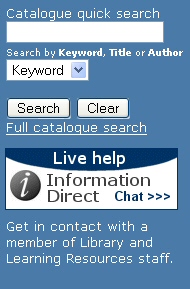
The Library Catalogue search widget on the LLR home page has been retained (see illustration above). However, please be aware that the link to ‘My Library Card’ which previously appeared under the Search and Clear buttons has been replaced with a ‘Full Catalogue Search’ link, which opens up the ‘Basic Search’ screen of the Library Catalogue in a new window.
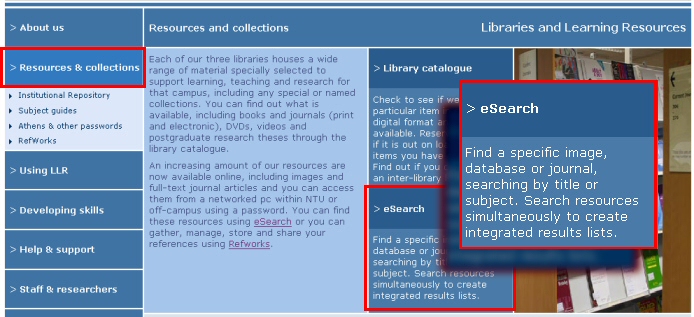
The principal access route to eSearch in the LLR web site can now be found under the ‘Resources and Collections’ heading of the LLR web site (see illustration below – click on image for larger version).
In light of this change, LLR is reviewing the Library Search widget in NOW (the new VLE) to see whether it would be appropriate to ‘match’ the revised LLR web site search widget by withdrawing the ‘Find a database’ eSearch search option from there as well.
Credo Reference – Athens login URL updated
The off-campus direct Athens login URL for the Credo Reference service has been updated in eSearch (for all five separate Credo listings: Complete; Biography; Dictionaries; Encyclopedias; Quotations) and now points to: http://www.credoreference.com/authathens.do.
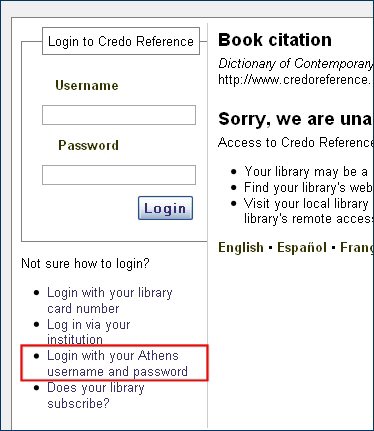
From within the Credo Reference interface, off-campus customers can access the login screen through the Login with your Athens username and password link under the ‘Book citation’ screen of any selected title (see illustration below).
Please be aware that, although Credo Reference offers a ‘Log in via your institution’ link (which connects to a Shibboleth login process), LLR is not yet supporting Shibboleth authentication for this service. eServices is working with Credo’s technical team on a number of issues which need to be resolved before LLR can migrate to Shibboleth-based authentication.
NTU banner in eBrary restored
Further to the last eServices update, the NTU banner at the top of each page of the eBrary interface has now been restored. (The banner had ceased to display correctly following the withdrawal of the Shelob web server.) Links from the eBrary site to the NTU homepage, the LLR homepage, the eBrary Reader download screen and the NTU eBrary User Guide are now available again and working normally.
Shibboleth login screen – amended layout
Following feedback from the ALT on the look-and-feel of the Shibboleth login screen, IS agreed to introduce a number of enhancements and refinements to the page. These changes went live last week. Overall, the changes streamline and simplify the look of the page. Specific changes include:
- Changing the description ‘NTU Single Signon’ to NTU Single Sign-on
- Removing the repeated and overlapping references to ‘logging in’
- Increasing the default text size on the page
- Replacing the ‘end of your session’ prompt with a simpler and more appropriate phrase
Further feedback on the design and useability of this page is welcomed.
‘Instructional guides’ and the LLR web site
Guides to registering for services such as Digimap, Land of Lost Content and WGSN; and to using services such as SciFinder Scholar, which used to available in the LLR web site are not currently accessible. This set of ‘instructional guides’ has not yet been migrated from the previous LLR web site template to the new web site design. These guides, which are accessed through links in eSearch (in the ‘information’ pop-up window for the relevant resource), should be available again shortly. A further update will follow once these guides have been recreated in the new LLR web site.
Unscheduled withdrawal of the ‘Shelob’ web server
The Shelob web server was withdrawn from service at NTU last week, leading to the loss of access to several important web files still being used by LLR on the server. This meant that the links in eSearch to BCIS (Building Cost Information Service) and FORS (Forensic Science Service) temporarily stopped working. This links have now been reinstated. It has also meant that the NTU ‘banner’ in the eBrary eBook interface no longer displayed correctly. This banner will be reinstated by eBrary shortly.
LLR Search widget for NOW – new version live next week
An updated version of the Library Search widget for NOW (the new VLE) is scheduled to go live on 7 October. (As a reminder – the widget is identical to the one embedded in the home page of the new LLR web site.) This updated version of the widget will display much more consistently and predictably in the three column layout of NOW.
HeinOnline – off-campus authentication now via Shibboleth
Off-campus authentication to the HeinOnline database is now by university username and password (using Shibboleth). Links and prompts in eSearch and SFX have been updated accordingly. Implementation decisions by HeinOnline mean that Athens based authentication to HeinOnline is no longer available to Nottingham Trent University staff and students, despite the existence of an Athens login option in the HeinOnline interface. Off-campus customers accessing HeinOnline through eSearch will be directed to the appropriate Shibboleth login screen.
More detailed information about the switchover, including a walkthrough to Shibboleth authentication in the native interface of HeinOnline has been added to the eServices Support wiki.
BUFVC (British Universities Film and Video Council) services – Shibboleth authentication now active
On-campus and off-campus access to the TRILT (Television and Radio Index for Learning and Teaching) and TVTiP TV Times Project 1955-1985 services from the BUFVC has been migrated from Athens to Shibboleth, and links in eSearch have been updated accordingly. Athens authentication to BUFVC services is no longer available. More detailed information, along with an illustrated walkthrough has been added to the relevant section of the eServices support wiki.
HeinOnline: technical difficulties resolved
The technical difficulties experienced by the HeinOnline legal database service earlier in the week have now been resolved. HeinOnline reports that their “systems have returned to normal and are functioning at full capacity.” Please contact eServices if you experience any continuing difficulties with access or functionality.
Authentication changes: IHS database services
On-campus and off-campus authentication to the IHS database services has changed, and links in eSearch have been updated accordingly. On-campus access to The Construction Information Service, OHSIS (Occupational Health and Safety Information Service) and Trading Standards Specialist is now direct; and off-campus access is via university username and password. Athens authenticated access to these services is no longer available at present.
These arrangements have been agreed with IHS as an interim arrangement to enable access to these services while the company’s work to support the new Shibboleth framework is completed. Once IHS is Shibboleth-compliant, off-campus access will continue to be by university username and password; while on-campus access may also then require a university username and password (i.e. no longer be direct). eServices will provide updates on this as IHS concludes its work to support Shibboleth.
 eResource updates
You must be logged in to post a comment.