Access to the ChildData service is now direct on-campus and by university username and password (using eZproxy) from off-campus. A guide to accessing resource which make use of eZproxy is available on the eServices Support wiki
Category: Shibboleth
JSTOR – off-campus access constraint
eServices is working with the JSTOR service to identify a problem affecting Shibboleth authentication from off-campus. Currently is not for a customer to select an NTU Shibboleth login link in the native interface of JSTOR. However, if an off-campus customer selects a link to JSTOR in eSearch, SFX or the LLR Library Catalogue, they will be able to log in to the service using their university username and password.
In short: LLR customers needing off-campus access to JSTOR must access the service through eSearch, SFX or the Library Catalogue in order to log in successfully.
Engineering Village – Shibboleth access unavailable
Off-campus access to the Compendex and Inspec databases (on the Engineering Village platform) is currently unavailable. eServices is working with Elsevier’s technical team to resolve the configuration problem which is currently causing Shibboleth logins to be rejected: customers will currently see a Shibboleth error screen when logging in from off-campus. A further update will follow once off-campus access has been restored.
Oxford Dictionary of National Biography – Shibboleth authentication
Access to the Oxford Dictionary of National Biography is now direct on-campus and by university username and password (using Shibboleth) off-campus. Links and prompts in eSearch have been updated accordingly. A guide to using Shibboleth authentication on the DNB has been added to the eServices Support wiki.
Oxford Reference Online Core Collection – Shibboleth authentication
Access to the Oxford Core Collection online is now direct on-campus and by university username and password (using Shibboleth) off-campus. Links and prompts in eSearch have been updated accordingly. A guide to using Shibboleth authentication on the Oxford Reference Core Collection Online has been added to the eServices Support wiki.
eBrary – Shibboleth authentication
Access to eBooks on the eBrary platform is now by university username and password (using Shibboleth). Because of the way in which Shibboleth authentication is managed for LLR’s subscription to eBrary, all existing URLs in eSearch, SFX and the Library Catalogue will continue to work as before, but will now resolve to the NTU Single Sign-on page rather than to an Athens login screen. Staff and students who wish to retain their customised eBrary content (stored in their Bookshelf) will need to contact eBrary to arrange the migration of data to their new login. A guide to the simple email-based process is provided via a ‘Bookshelf Migration’ link from the Nottingham Trent University banner in the eBrary interface (see illustration below).

Lawtel – Shibboleth authentication
Access to the Lawtel service (which was previously by Athens username and password) is now direct on-campus and by university username and password off-campus. Links in prompts in eSearch have been updated accordingly. Please be aware that the access URL has changed as a result.
Science Direct Off-Campus Access Restored
I’m pleased to announce that normal access to Science Direct off-campus via eSearch has now been restored.
Apologies for any inconvenience caused.
Science Direct Off-Campus Access
We are continuing to work on resolving the Science Direct off-campus eSearch access problem. In the meantime we have deployed a temporary work around.
- Access Science Direct via eSearch as normal and select the link
- The link will take you to the Science Direct home page
- From there select Athens/Institution Login

- Next select UK Access Management Federation from the drop down box

- A list of institutes will be diosplayed below, Select Nottingham Trent University
- Sign in using your University Username and Password
Science Direct Off-Campus Shibboleth Identity Provider Failure
Off-campus Shibboleth access to Science Direct via eSearch is currently unavailable.
When trying to access Science Direct via eSearch off-campus, you receive the following message:
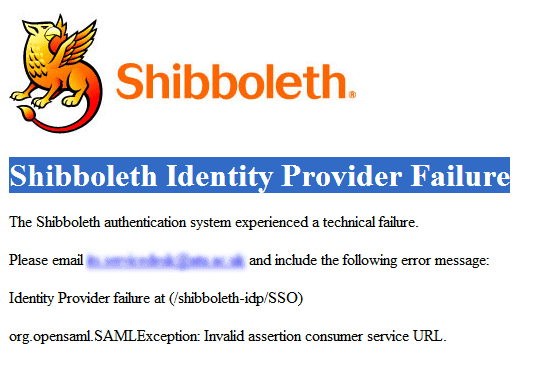
This problem has been logged with our ITS Service Desk and we hope to have restore off-campus access online soon.
On-campus access in not effective.
Athens to Shibboleth migrations – eBrary and RefWorks
The move from Athens to Shibboleth authentication for both eBrary and RefWorks is now scheduled to take place during the last two weeks of August.
RefWorks’ technical team are running tests on a sample data set that we have provided before moving to the wholesale transfer of the existing accounts from Athens to Shibboleth identifiers – this will mean that existing customer accounts (including all saved references and folders) will be automatically transfered over when the move to Shibboleth is effected.
For LLR customers with ‘Bookshelf’ content (saved favourites, notes, highlighted sections of eBooks, etc) in their eBrary account, a different method has been agreed with the providers. Once the Shibboleth login process has been activated on eBrary, customers will have the option to pull across their previously stored ‘Bookshelf’ information from their Athens to their Shibboleth account. This involves the customer copying a ‘key’ number from the screen into an email to eBrary along with their Athens username; eBrary then manage the move of the data on their behalf. Customers who have not previously used the ‘Bookshelf’ facility, or who do not wish to transfer their previous saved content, are not required to take any action. The simple process of arranging the ‘Bookshelf’ transfer will, of course, be fully documented with eServices providing all necessary technical support.
Emerald – Shibboleth authentication
Off-campus access to the Emerald platform is now by university username and password (using the Shibboleth framework). Links and prompts in eSearch and SFX have been updated accordingly.
A guide to Shibboleth authentication on the Emerald platform has been added to the eServices Support wiki.
Members of relevant Delegated Centres and NTU Alumni will continue to use an Athens username and password to access the Emerald service.

 eResource updates
You must be logged in to post a comment.