Update: Service problems affecting Science Direct and Scopus

Intermittent problems have returned to affect both the Science Direct and Scopus services this morning (9 June 2015); with some requests timing out or ending in ‘service unavailable’ responses.

Further updates will follow as the situation is resolved.

Update: Service problems affecting Science Direct and Scopus

The reported service problems (8 June 2015) affecting the Elsevier Science Direct and Scopus platforms appear to have been successfully resolved.

Service problems affecting Science Direct and Scopus

An unscheduled service outrage is currently preventing access to all Science Direct and Scopus services. A further update will follow once all services have been recovered.

New resource: Bloomsbury eBook collection

Around 2000 eBook titles from Bloomsbury Collections are now available in Library OneSearch, and form part of the continuing ‘Your Books, More Books’ campaign. Example titles include:

Access to Bloomsbury eBook titles in the 40 collections which the library has subscribed to is direct on-campus and by university username and password from off-campus. At present, support for the Shibboleth protocol on the Bloomsbury Collections platform is limited, so we are unable to incorporate authentication-aware direct title-level deep-links in the Library OneSearch records for customers accessing Bloomsbury Collections titles from off-campus.

As a consequence, the current off-campus experience when logging in to the first Bloomsbury Collections book involves several steps (which are documented below). The library is continuing to impress on Bloomsbury the need to improve this far from seamless off-campus experience, and Bloomsbury’s technical team are reviewing LLR’s specification for improved off-campus deep-linking. Further updates will be provided as and when this element of the service offer improves. The current walkthrough for off-campus access is as follows:

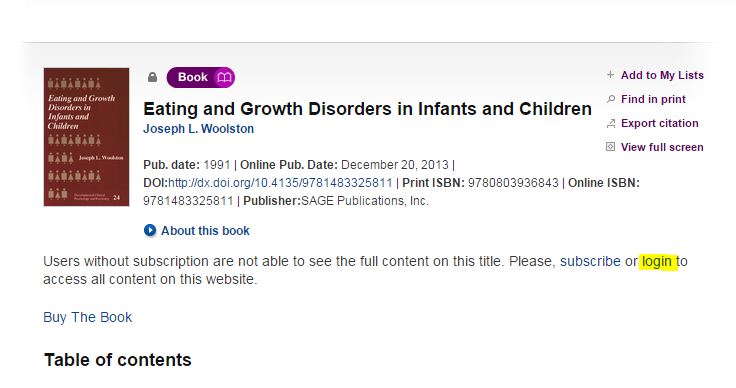
Follow the View Online link from Library OneSearch, and on the Summary page for the requested title select the login option (see below).

Bloomsbury Collections - Shibboleth access - Library OneSearch

Select the Log In option in the top-right of the display on the Bloomsbury Collections site (see below).
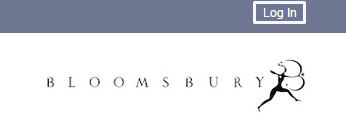
Bloomsbury Collections - Login option

On the main Log in page, select the link for the Shibboleth login page (see below).
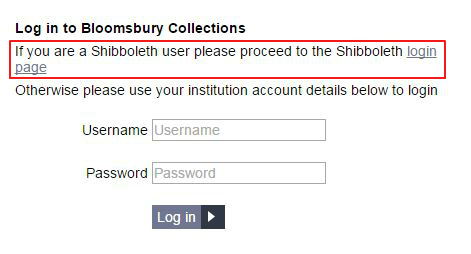
Bloomsbury Collections - Shibboleth option

On the Shibboleth WAYF (‘Where Are You From?’) page, select ‘Nottingham Trent University’ (if this option displays at the top of the list), and click on that link to be resolved to the NTU Single Sign-on page. If this option does not display, click on the Show Organizations link (see below).
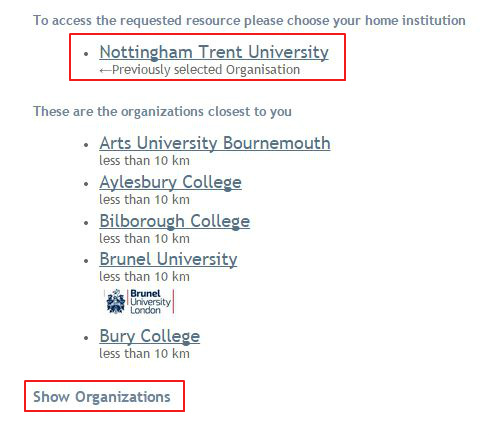
Bloomsbury Collections - Shibboleth WAYF page

This will reveal a full list of organizations and a filter search box (see below). In the search box, type ‘Nottingham Trent University’ and click on that entry in the results list. This will resolve the browser to the NTU Single Sign-on page.
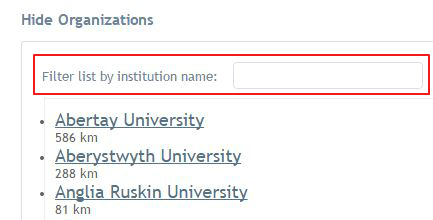
Bloomsbury Collections - Shibboleth WAYF page - find Nottingham Trent University

After successfully signing in with a university username and password, the browser will resolve to the Bloomsbury Collections home page. Confirmation of your logged-in status is provided by the display of the phrase: ‘Bloomsbury Collections – Access provided by Nottingham Trent University‘ (see below).
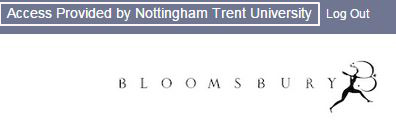
Bloomsbury Collections - Access provided by Nottingham Trent University

To access the requested eBook, click on the Recently Viewed link to reveal a list of recently requested titles, and click on the required title (see below).
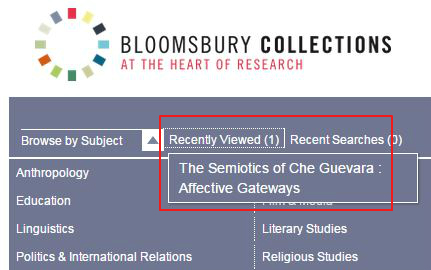
Bloomsbury Collections - Recently Viewed link

When the browser resolves to the requested eBook page, the unlockled padlock icon next to the the phrase ‘Subscription-based Access’ is further confirmation that access to the full-text of the title is now available.

Bloomsbury Collections - Access to a subscription title

Subsequent requests from Library OneSearch to Bloomsbury Collection titles (in the same off-campus session) will resolve to the authenticated full-text at the title level.

Keynote: new WAYFLess access URL to new interface

The WAYFLess access URL for the Keynote service (the URL which routes the requester straight to the NTU Single Sign-on page) has been updated in Library OneSearch, following the launch of the new Keynote platform. Access remains by university username and password from on-campus and off-campus.

Keynote interface - April 2015

RefWorks service issue – 26 March 2015

Customer Services were alerted to issues affecting RefWorks services yesterday evening (26 March) shortly after 19:00. These included slow response times, page time-outs and browser errors.

On- campus use of RefWorks was particularly high at the time, due to assignment submission deadlines.

The RefWorks technical team in the US were able to identify and rectify the problem, and confirmed full recovery of services before 20:40.

Sage Knowledge eBook collection

As part of the continuing growth of the ‘Your Books, More Books’ service, just over 4,300 new eBook titles from Sage Knowledge are now discoverable in Library OneSearch. Example titles include:

Access to all subscribed titles in the collection is direct on-campus, and by university username and password from off-campus. At present, support for the Shibboleth protocol on the Sage Knowledge platform is limited, so we are unable to incorporate authentication-aware direct title-level deep-links in the Library OneSearch records for customers accessing Sage Knowledge titles from off-campus.

As a consequence, the current off-campus experience when logging in to the first Sage Knowlege book in a collection involves several steps (which are documented below). The library is continuing to impress on Sage the need to improve this far from seamless off-campus experience, and further updates will be provided as and when this element of the service offer improves. The current walkthrough for off-campus access is as follows:

Sage Knowledge - eBook - select 'Login'

Follow the Online link from Library OneSearch, and on the Summary page for the requested title select the login option (see above).

Sage Knowledge - eBook - select 'Login via institution'

On the login pop-up which displays, select Login via your institution (see above).

Sage Knowledge - eBook - 'Select institution'

From the Please select your institution list locate ‘Nottingham Trent University’ and click on the Go to Login button (see above). On the NTU Single Sign-on page, enter your university username and password and log in.

Sage Knowledge - eBook - NTU login confirmed

Your browser will be returned to the homepage of the Sage Knowledge platform (and not to the individual eBook record). In the top-right hand corner of the screen, the display of ‘Nottingham Trent University’ will confirm that the login request has been processed successfully.

Sage Knowledge - eBook - NTU login confirmed

Return the brower to the tab or page containing the display of results from Library OneSearch and click on the View Online link for a second time. This will return the display in your browser of the Sage Knowledge platfom to the authenticated full-text of the requested eBook, with the display of the Nottingham Trent University logo in the top right-hand of the screen confirming that a current logged-in session is active.

Subsequent requests from Library OneSearch to Sage Knowledge titles (in the same off-campus session) will resolve to the authenticated full-text at the title level.

Science Direct – intermittent SFX linking issues resolved

A problem which was causing intermittent errors on requests from SFX to article content on the Elsevier Science Direct platform has now been resolved.

In some cases, requests were being resolved from SFX to an error page, even though the full-text was discoverable by direct searches on the Science Direct platform.

Requests from Library OneSearch, through SFX, to Science Direct full-text content should all now be resolving normally.

New eBooks update

Several new collections of eBooks have been added to Library OneSearch in the last weeks; and a number of other new collections of eBook titles will be joining them shortly, as part of a significant extension to our current eBook offer. Amongst the recent additions are the following:

Cambridge University Press (EBA Collection) (27,800+ titles)  Example titles include:

Oxford Scholarship Online (EBA Collection) (10,700+ titles) Example titles include:

Sustainable Organization Library and Greenleaf Online Library (260+ new titles) New titles added include:

ProQuest maintenance period – Sunday 1 March 2015

A maintenance upgrade to the main ProQuest infrastructure is scheduled for Sunday 1 March 2015 – starting at 03:00 UK time and lasting until 08:00. During this time, the following services will be unavailable:

  • Chadwyck-Healey databases (such as Literature Online)
  • LibraryThing for Libraries (which supports the IRep NTU authors showcase)
  • ProQuest platform (search.proquest.com) (all 24 databases, including the British Humanities Index, PsycArticles, The Vogue Archive, etc.,)
  • ProQuest Syndetic Solutions (which supports the book cover display and the ‘Learn more about this book’ feature in Library OneSearch)
  • RefWorks (all RefWorks services)

New resource: ProQuest Dissertations & Theses: UK & Ireland

Access to the new ProQuest Dissertations & Theses: UK & Ireland service has been enabled in Library OneSearch. The new service replaces the now-withdrawn Index to Theses service. Access to the new resource is direct on-campus and by university username and password from off-campus. ProQuest Dissertations & Theses: UK & Ireland is described as follows:

ProQuest Dissertations and Theses: UK & Ireland provides details of doctoral theses awarded by institutions in the United Kingdom and Ireland dating back to 1716. Along with detailed descriptive records, including a large proportion of abstracts, the service provides PDF previews of selected theses, where these are available. The collection covers PhD theses in the following subject areas: business, health and medicine, history, literature and language, science and technology, social sciences, and the arts.

As part of the search.proquest.com platfrom, the new service can be search independently or alongside one or more of the 23 other databases provided through the ProQuest site. The new resource has been has given the same category assignments as the previous Index to Theses service, namely:

  • Architecture and Civil Engineering – Architecture;
  • Architecture and Civil Engineering – Civil and Structural Engineering;
  • Architecture and Civil Engineering – Furniture and Product Design;
  • Architecture and Civil Engineering – Interior Architecture and Design;
  • Art and Design – Furniture and Product Design;
  • Criminology and Youth Justice – Criminology;
  • Criminology and Youth Justice – Youth Justice;
  • Education, Teacher Training, Childhood + Youth Studies – Youth Studies
  • Law – Research Methods;
  • Politics and International Studies – Research Methods;
  • Property, Construction and Surveying – Building and Construction;
  • Property, Construction and Surveying – Property;
  • Property, Construction and Surveying – Surveying;
  • Psychology, Sociology and Counselling – Psychology and Counselling;
  • Psychology, Sociology and Counselling – Research Methods;
  • Public Health – Public Health;
  • Social Work, Health and Social Care – Social Work;
  • Social Work, Health and Social Care – Health and Social Care;

Withdrawn resource: Index to Theses

Access to the Index to Theses service has been withdrawn from the ‘Find Databases’ service of Library OneSearch following the winding up of the resource. Index to Theses is superceded by the new ProQuest Dissertations & Theses: UK & Ireland service.