eBrary eBooks – Understanding the ‘Document unavailable’ message

LLR’s subscription to eBooks on the eBrary platform is to a virtual ‘collection’ of several tens of thousands of eBook titles. Like other ‘aggregator’ collections the subscription guarantees access to the collection as it changes and evolves over the course of the subscription rather than to a fixed list of guaranteed titles. As publisher agreements with eBrary change, new titles are routinely added to the collection and some existing titles are withdrawn from it.

Once a month, eBrary publishes a list of the titles that have been added to, and withdrawn from, the collection over the course of the previous four weeks – sometimes the changes affect less than a dozen titles in total; at other times the changes involve a hundred items or more (out of an overall collection of 30,000+ titles). As these lists of changes are published, the eServices team adds catalogue records for additions to the eBrary collection to ALEPH, and deletes catalogue records for withdrawn eBrary titles.

As these updated lists are only published monthly by eBrary, and then require processing and loading/deleting on ALEPH by LLR, there will sometimes be brief periods when there are some eBrary catalogue records on ALEPH for titles that have been withdrawn by eBrary. In these cases, clicking on the link in the Library Catalogue will produce a ‘Document unavailable’ message (see sample illustration below). There may also be new eBrary titles now available in the collection for which individual catalogue records have yet to be added to ALEPH.

If you encounter any examples where a ‘Document unavailable’ response to an eBrary catalogue record is proving particularly problematic for customers, please provide the eServices team with the details and we will arrange to suppress the appearance of that record in the catalogue pending confirmation from eBrary of the title’s withdrawal from the collection. That record will be removed from the catalogue during the next eBrary record update; and any new records will be added.

The 'Document Unavailable' prompt on the eBrary eBook platform

Knovel: access restored

Access to LLR’s subscription to Knovel has been re-enabled. Links in eSearch have been restored, and links from the Library Catalogue to eBook content in the Knovel platform are now resolving correctly. Please contact eServices if you continue to experience any further problems.

SFX – ‘Find it @ NTU’ – enhancement to the library look-up

An enhancement to the way in which the SFX (Find it @ NTU) service checks the library catalogue for print journal holdings has now gone live. Previously, when SFX found a matching ISSN in the library catalogue, a link to the catalogue record was offered in the SFX menu.

Now, SFX is able to pull back from ALEPH the ‘summary holdings’ statement in the catalogue record and display that information in the SFX menu alongside the link (see illustrations below).

sfx_opac_09a

Feedback on this new functionality is welcomed, and can be shared with ALT members of the ‘SFX and eSearch Development Group’ Jon Fletcher and Rachel Campbell.

eSearch ‘Find a database’ search widget withdrawn from LLR web site home page

Following initial feedback on the new LLR web site, the site project group have decided to withdraw the eSearch ‘Find a database’ search widget from the LLR home page.

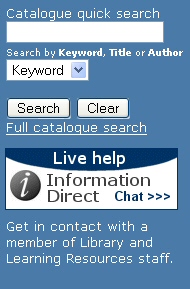
An ‘Information Direct’ button and explanatory text have been added in its place (see illustration below).

LLR web site Library Catalogue search widget

The Library Catalogue search widget on the LLR home page has been retained (see illustration above). However, please be aware that the link to ‘My Library Card’ which previously appeared under the Search and Clear buttons has been replaced with a ‘Full Catalogue Search’ link, which opens up the ‘Basic Search’ screen of the Library Catalogue in a new window.

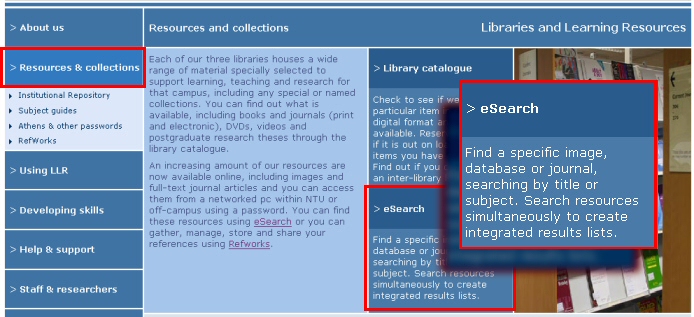
The principal access route to eSearch in the LLR web site can now be found under the ‘Resources and Collections’ heading of the LLR web site (see illustration below – click on image for larger version).

LLR web site - Resource and Collections section showing principal access route to eSearch

In light of this change, LLR is reviewing the Library Search widget in NOW (the new VLE) to see whether it would be appropriate to ‘match’ the revised LLR web site search widget by withdrawing the ‘Find a database’ eSearch search option from there as well.

Ulrich’s Periodicals Directory – Library Catalogue search

It is now possible to run an ISSN or Title search on the LLR Library catalogue from the Full View of any journal record within the Ulrich’s Periodicals Directory (although, we can’t, unfortunately, correct Ulrich’s spelling of ‘Catalog’ :). The twin direct search links are located above the navigation tabs of the record (see illustration below).

ulrichs_opac_01.jpg

Journal Citation Reports: Library Catalogue search

From within the Full View of a journal record on the ISI Web of Knowledge Journal Citation Reports, it is now possible to run an ISSN search directly on the LLR library catalogue. To activate the search, click on Go button next to the link in the bottom right-hand quarter of the screen (see illustration below).

jcr_opac.jpg

ALEPH – problem with remote search services resolved

The restart of the ALEPH server has cleared the problem that SFX was experiencing in querying the Library Catalogue – so links in SFX to ALEPH have been reinstated and confirmed as working.

Please let eServices know if you experience any further problems.

ALEPH server back in service

ALEPH server has successfully been restarted by IS and all services now appear to be working fine. This means that ALEPH client, self service and Web OPAC should all be working again, but please let eServices know if you’re still experiencing problems.

Problems with ALEPH server

ALEPH server Portia is experiencing a significant number of application and operating system errors. In an effort to resolve this IS need to restart the server, with immediate effect. This means that all ALEPH applications, including self service and Web OPAC will be out of action whilst the restart is taking place. Hopefully this will take about 30 minutes to complete.

A further notice will be sent out when ALEPH server is back in service again,

Problem with remote search services on ALEPH

A technical problem with a ‘look-up’ service on the ALEPH server started to cause problems with SFX requests at around 15:45 this afternoon.

ALEPH stopped responding to ‘look-up’ requests from SFX, based on ISSN and ISBN. The result was first a delay and then a time-out of the SFX service.

To enable the immediate recovery of the SFX service, requests to ALEPH from SFX have been temporarily disabled. A message has been added to the SFX menu indicating that ‘SFX is currently unable to check the library catalogue for this item’ (see screengrab below). This has been done for both the existing and new installations of SFX.

SFX - 30 January 2008

Searches of the Library Catalogue from RefWorks are also affected.

However searches carried out within the Library Catalogue, or via eSearch are working normally.

An update will be provided once a resolution for this technical problem is in place and remote search services restored.

JISC e-Book Observatory Project – remaining titles added to the Library Catalogue

Records for the 10 Lippincott Williams & Wilkins titles included in the JISC e-Book Observatory Project, provided through the Books@Ovid platform, have now been added to the library catalogue. Access to these titles is by Athens username and password.

New resources: JISC e-Book Observatory Project

Access to an initial set of 26 eBooks made available through the JISC e-Book Observatory Project has now been enabled in the Library Catalogue. Access to these titles, which are provided through the MyiLibrary platform, is by Athens username and password.

To review and access the 26 MyiLibrary titles, click here.

A further 10 titles, made available through the OVID platform, will be activated shortly.